Browser Companion · Launch access

Know whether the LEGO set is worth buying before checkout.

BrickPicker identifies the set on the retailer page and puts the deal signal, market history, retailer comparison, and reseller math beside the product you are already shopping.

No Chrome Web Store link yet. One BrickPicker account unlocks the companion when launch access opens.

amazon.com/stores/LEGO
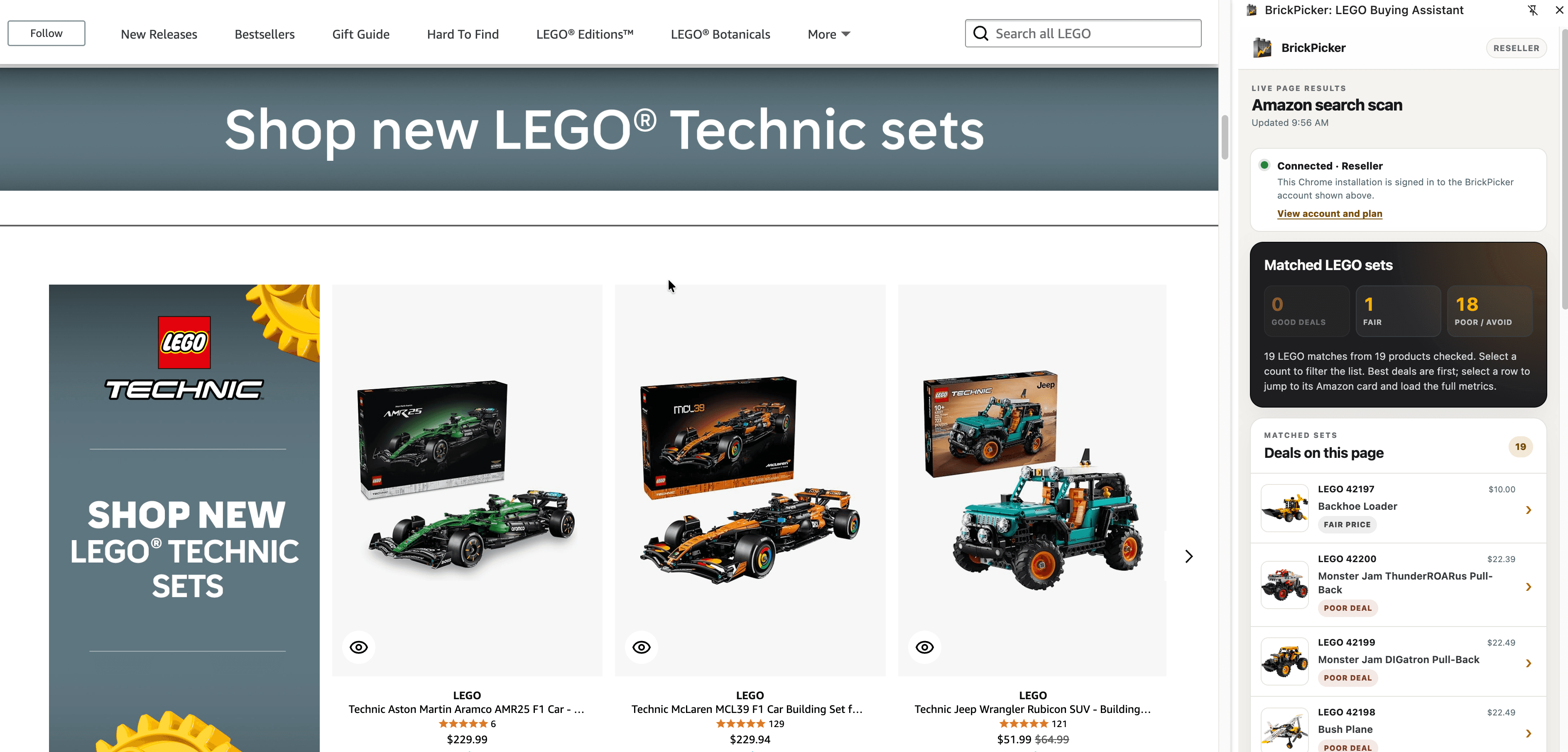
BrickPicker Browser Companion matching 19 LEGO products on an Amazon store page and ranking them in the side panel

Real launch-candidate capture. Retailer pages remain intact; BrickPicker analysis appears in Chrome's side panel.

Released retailer families

AmazonCore
LEGO.comCore
WalmartCore
TargetOptional
Best BuyOptional
Barnes & NobleOptional
Kohl'sOptional

Amazon, LEGO.com, and Walmart are core access. Target, Best Buy, Barnes & Noble, and Kohl's are opt-in retailer permissions you control.

One companion, three levels of proof

The answer gets deeper when the decision gets more serious.

Free tells you whether to look closer. Collector explains the market. Reseller shows whether the purchase can become profit.

Free

The fast answer

See the set BrickPicker matched, the price on the page, MSRP context, and a basic deal signal without opening a dozen tabs.

  • Basic deal signal on supported products
  • Search-page matches on supported list pages
  • Five distinct checks before a free account is required
Collector

The market context

Understand whether today is actually a strong entry point with the market value and history behind the headline price.

  • Current sealed and used market value
  • Retail price history and recorded lows
  • BrickScore and retirement context

Reseller

The sourcing decision

Turn a discount into a real business decision with selling costs, marketplace depth, demand evidence, and venue-specific profit.

  • Amazon, eBay, and Walmart fee-aware profit scenarios
  • eBay sold and active-listing evidence
  • BrickLink sold, inventory, and part-out context
  • Retail-demand intelligence and sourcing actions

From page to decision

Stop rebuilding the same comparison in seven tabs.

The Browser Companion keeps the retailer in view and brings the BrickPicker evidence to it.

01

Shop normally

Open a LEGO product or supported list page at a retailer you have enabled. BrickPicker stays out of the way until there is a useful match.

02

See the signal

A compact badge shows the initial deal signal. Open it to see the matched set and the analysis available to your plan.

03

Make the call

Compare retailers, inspect price history, or run the full reseller economics before you buy, wait, or move on.

The full market story

A discount is not the same thing as a good buy.

BrickPicker compares the price on the page with competing retailers, recorded lows, sealed and used market value, BrickScore, retirement context, and the actions available to your account.

  • See when another retailer is lower before you buy
  • Separate current price, tracked price, and market value
  • Save to Watchlist or Brickfolio, or record the purchase
  • Open retailer comparisons in a new tab only when you click
Get launch access
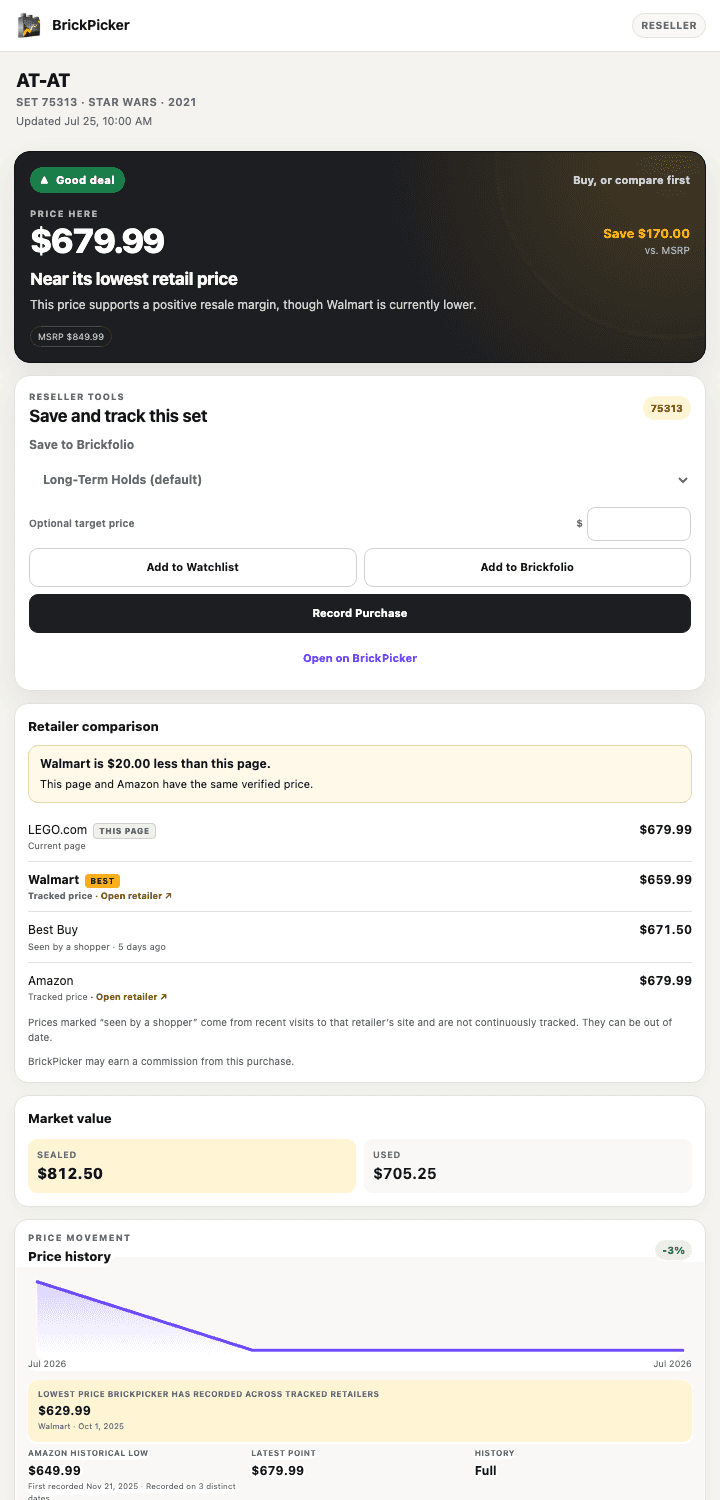
BrickPicker Reseller panel showing a good-deal verdict, retailer comparison, market value, price history, and Brickfolio actions for LEGO set 75313

Illustrative interface preview using sample set data.

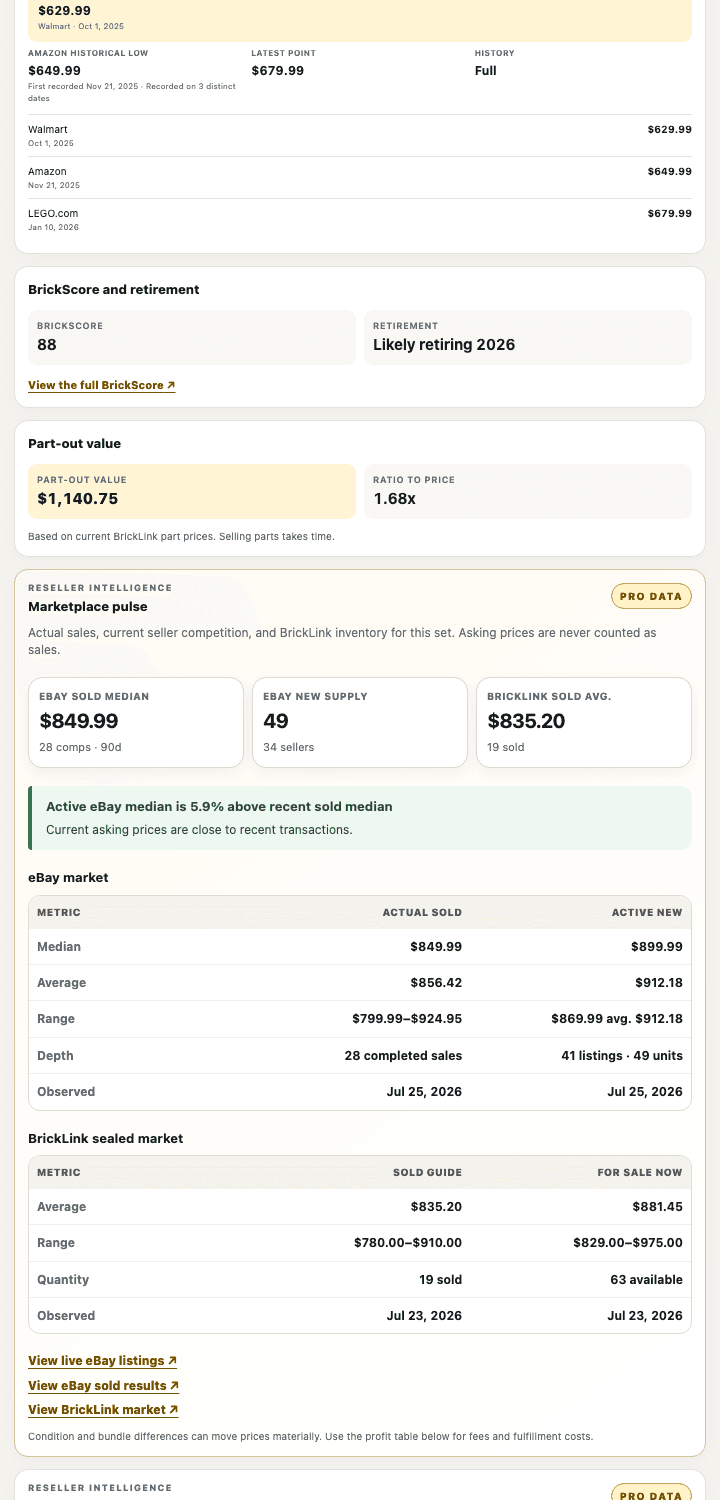
BrickPicker Reseller intelligence showing price history, BrickScore, part-out value, eBay completed sales, active listings, and BrickLink market depth

Illustrative interface preview using sample set data.

Reseller intelligence

Profit after fees, not profit by wishful thinking.

The Reseller view connects the buy price to actual sold evidence, current competition, marketplace costs, and the price you can defend.

Fee-aware profit

Venue-specific fees and fulfillment costs turn spread into payout.

eBay evidence

Completed sales stay separate from active asking prices.

BrickLink depth

Sold averages, availability, and part-out value frame the floor.

Demand context

Retail and marketplace activity show whether inventory is moving.

Product tour

See the companion work where the purchase happens.

Follow a retailer page from matched products to the full BrickPicker decision.

The retailer scan is a real launch-candidate capture. Reseller detail screens use sample data to demonstrate the interface.

Permission by permission

Retailer access without checkout access.

The companion has one purpose: identify LEGO products on retailers you have granted and show BrickPicker analysis.

Sensitive shopping data stays out

No passwords, payment information, checkout data, cart contents, or order history.

Additional retailers are optional

Target, Best Buy, Barnes & Noble, and Kohl's activate only after you grant that retailer access.

Actions require your click

Watchlist, Brickfolio, purchase records, and comparison links happen only when you choose them.

Read the full BrickPicker privacy policy. Optional retailer access can be removed later from the extension.

FAQ

Before launch access opens

The important details, without the permission-screen legalese.

Is the Browser Companion available in the Chrome Web Store yet?
Not yet. Join with a free BrickPicker account for launch access and release updates. The page does not send you to an unpublished store listing.
Which retailers are supported?
The released retailer families are Amazon, LEGO.com, Walmart, Target, Best Buy, Barnes & Noble, and Kohl's. Product and list-page behavior can differ by retailer, and BrickPicker can temporarily disable an adapter when a retailer changes its page.
What does the extension read?
On a granted retailer page it may read product identifiers, LEGO set-number clues, title, displayed price, availability, seller and condition signals, and the product URL needed to identify the item. It does not read full page HTML, retailer search queries, carts, checkout, payment information, passwords, or order history.
Do I have to enable every retailer?
No. Amazon, LEGO.com, and Walmart are the core retailer permissions. Target, Best Buy, Barnes & Noble, and Kohl's are enabled only when you choose to grant their optional access, and you can remove that access later.
Does BrickPicker change retailer links?
No. Native retailer links remain unchanged. Eligible comparison links inside the BrickPicker panel open only after your click, open in a new tab, and carry a visible commission disclosure when BrickPicker may earn a commission.
Do I need a separate extension subscription?
No. The Browser Companion uses your existing BrickPicker account. Free, Collector, and Reseller capabilities follow the plan you already have.

Bring BrickPicker to the aisle you already shop.

Create a free BrickPicker account now and be ready when Browser Companion launch access opens.