


You're three coffees deep on a Tuesday morning and the Slack notification you really wanted didn't come. The Bonsai Tree you've been hunting went on sale at Walmart at 2:47am, sold out by 7:15am, and you only know because someone in your Discord is laughing about scoring six of them.
Here's the thing nobody tells you about LEGO investing: the price is rarely the problem. The timing is the problem. Retailer markdowns aren't scheduled, retirement signals leak out in fragments, and the aftermarket reacts to news you didn't get. By the time you check the price guide on Sunday, the move has already happened.
BrickWatcher is the LEGO price tracker we built to fix that. It runs while you sleep, watches every retailer and every store within driving distance, and pings you the moment one of them does something you'd actually act on. This post is a primer on what it does, who it's for, and how to set it up.
Why we built BrickWatcher
Most price trackers are single-retailer, built for "is this toaster cheaper than last month?" — not for LEGO. They don't know the MSRP of a set that retired three years ago. They don't track eBay sold comps. They have no idea that Walmart marked the Death Star down to $399 in three specific stores in your metro area while leaving the online price untouched.
The LEGO market needs a different shape of tool. Resellers want LEGO deal alerts across Amazon, Walmart, Target, Barnes & Noble, and Kohl's at once, with discount thresholds they control. Collectors want LEGO restock alerts for a grail set they've been hunting for six months. Investors want LEGO retirement notifications the moment distribution starts thinning — that's the window where the aftermarket curve gets steep. And everyone wants the alerts to fire at 3am, because 3am is when the markdowns happen.
That's the gap. Real-time signals across price, availability, retirement, and aftermarket — wired into one product, tuned to fire when it matters.
What BrickWatcher does
At its core, BrickWatcher is a multi-list watchlist that turns every set you care about into a stream of actionable alerts. You build lists, you add sets, you toggle which kinds of alerts you want, and the system does the rest.
Five alert types, one feed
Every set in BrickWatcher can have any combination of five alert types enabled, per-item, with its own thresholds:
- Price drop. The classic. You set a target price; any tracked retailer dipping to or below that price fires an alert.
- Deal alert. Fires when any first-party retailer marks the set down by a percentage you control — default 20% off MSRP, configurable per item. Catches Black Friday markdowns, end-of-quarter inventory dumps, and the random Tuesday-morning sales nobody announces.
- In-stock nearby. You save a ZIP and a mileage radius. BrickWatcher watches Target, Walmart, Barnes & Noble, and Kohl's stores within that radius and fires the moment the set shows up in stock. If a set is perma-OOS online but stores keep getting trickle inventory, this is the alert that catches it.
- Retirement signal. Our model classifies every tracked set as
active,thinning_distribution,eol_signaled, orlikely_retiredbased on first-party retailer presence and MSRP-vs-aftermarket spread. When a set transitions to a worse status, you get a notification. Historically, that window is where the appreciation curve gets steepest. - Aftermarket jump. Fires when a set's eBay sealed median moves by more than a threshold you set (default 10%) month-over-month. Useful when you're holding inventory and deciding when to list.
Most resellers run all five on sets they're serious about. Each alert type sends its own context — price vs target, store + distance, status transition, percentage move.
Multiple named lists
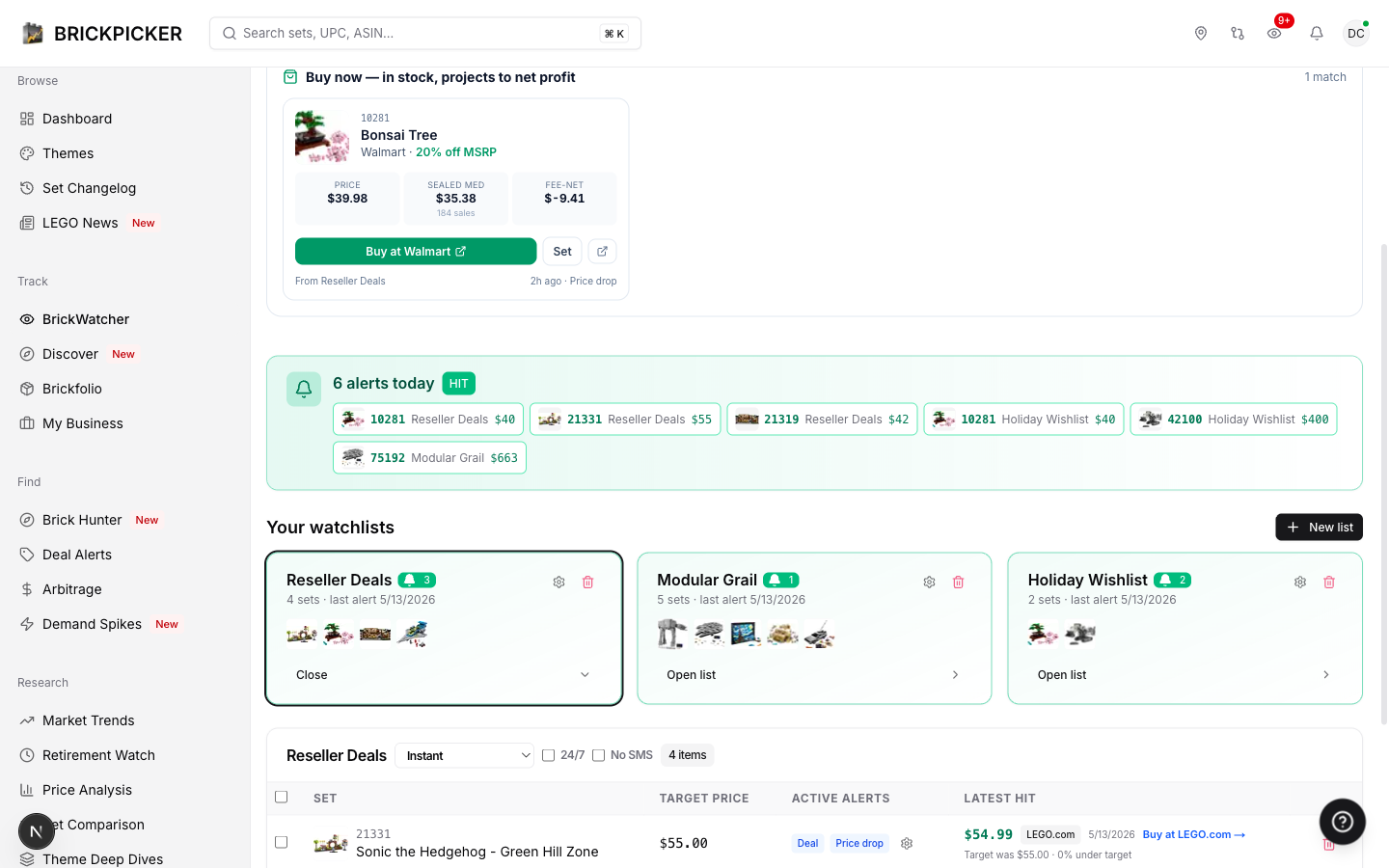
The old single-list model didn't fit how people actually work. The new BrickWatcher gives you multiple named lists, each tuned for a different purpose. Plan tiers gate how many you get:
- Free — 1 list, 5 sets
- Collector — 5 lists, 25 sets each
- Reseller — 20 lists, 100 sets each
When you create a list you pick from four templates: Resale targets, Long-term holds, Holiday wishlist, or Custom. The template just primes the right defaults — you can change anything afterward. You can move sets between lists in bulk with a couple of clicks.
Multi-channel delivery
Every alert lands in three places:
- In-app, on the BrickWatcher cockpit. Always on, every tier.
- Email, with templates tuned per alert type — price-drop emails show target vs hit, in-stock emails show store + distance, retirement emails show the status transition.
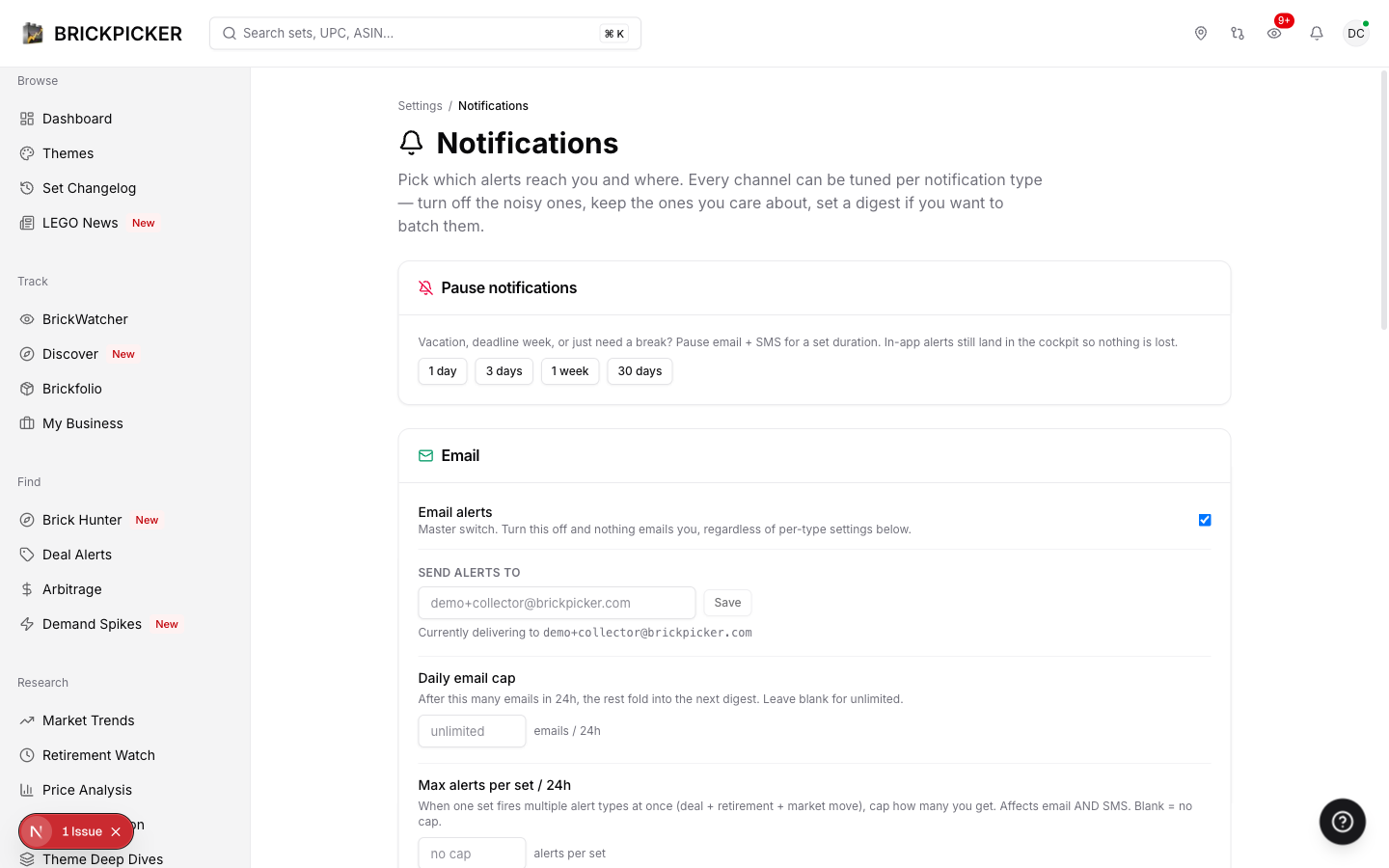
- SMS for paid tiers, with quiet hours so you don't get pinged at 3am unless you want to.
- Webhooks for users who want to pipe hits into Discord, custom dashboards, Zapier, or anything else that listens for JSON.
Each list has its own digest cadence — instant, hourly, or daily — that overrides your global setting. So your "Resale targets" list can fire instantly while your "Long-term holds" list batches into a daily digest. You can also flag a list 24/7 to bypass quiet hours, or No SMS to keep that list email-only.
The cockpit
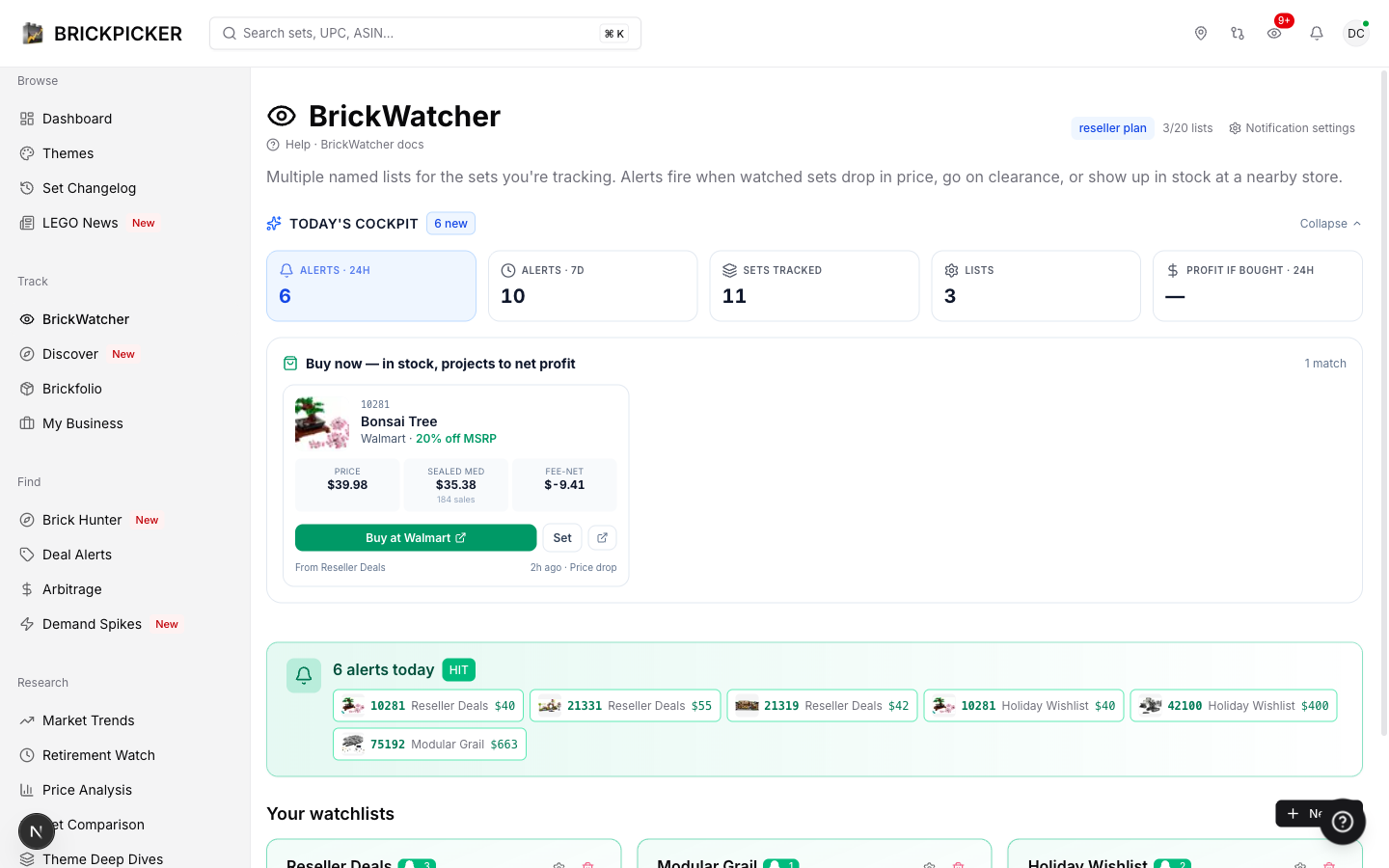
When you open BrickWatcher, you don't open a list — you open a cockpit. A KPI strip shows alerts in the last 24 hours, alerts in the last 7 days, total sets tracked, and the sum of fee-net profit if you bought every in-stock alert that fired today at the price it fired at. That last number is real money on the table this morning, computed against the eBay sealed median net of marketplace fees.
Under the KPI strip is the Buy Now grid — every alert from the last 24 hours where the retailer is still in stock and the projected resale margin is positive. Set image, hit price vs MSRP, sealed-median context, fee-net profit, and a green "Buy at [retailer]" button.
Below that: Retiring soon (sets in your lists that just flipped to eol_signaled or likely_retired) and Maybe recalibrate (alerts you configured 30+ days ago that haven't fired once — your threshold is too tight, or the set has moved out of your strategy and you can delete it).
Three personas, three setups
The same feature serves different people very differently. Here's how three archetypal users would set up BrickWatcher.
The Flipper
You buy LEGO to resell. You don't care about display; you care about margin. You want 30%+ off at first-party retailers, fee-net positive at the current eBay sealed median.
Your setup:
- Create a list called "Resale targets" from the Resale targets template.
- Add 20–50 sets you've successfully flipped before — Star Wars UCS, ICONS modulars, retired Creator Expert, large Technic. Pull from your sales history or Brick Hunter's deal feed.
- On each row, enable Deal at 30% minimum and In-stock nearby with your ZIP and a 50-mile radius. Skip price-drop — deal-alert covers it.
- Set the list digest to Instant and flag it 24/7. You want pinged the moment a deal hits, even at 4am, because half the good markdowns get cleared by sunrise.
- Optional: enable Aftermarket jump at 15% on sets you're already holding. That tells you when to list, not when to buy.
The flipper's win condition is throughput. BrickWatcher should fire two to ten alerts a week, most of which become Buy Now cards. If you're getting zero alerts after a month, open Maybe recalibrate and loosen your thresholds.
The Collector
You're not flipping; you're building. You want the Bonsai Tree on your shelf, you want to know when LEGO retires the Modular you've been eyeing, and you'd like to be the person in your friend group who catches the restock instead of missing it.
Your setup:
- Create a list called "Display collection" from the Long-term holds template.
- Add the sets you actively want — the ones you'd open and build. Start here, not on a wish list of fifty.
- Enable In-stock nearby with your ZIP and a 25-mile radius (collectors don't drive two hours), and Retirement signal (no threshold — the status transition itself is the signal).
- For sets you want at a discount, enable Deal at 20%. A 20%-off Modular is the markdown you don't want to miss.
- Set the list digest to Daily. A single morning email is fine.
Bonus: any set in your Brickfolio can be added to a watchlist with one click. Your "Sets I own" list becomes your retirement-watch list — when one of your sealed holdings flips to likely_retired, that's your cue to list or hold.
The Casual Fan
You're not building a portfolio. You just want to know when the Bonsai Tree drops below $40 so you can grab one for your sister-in-law's birthday.
Your setup:
- Create a list called "Gifts" from the Holiday wishlist template. Free tier gives you one list and five sets — perfect.
- Add the one or two sets you're hunting. Type the set number, hit add.
- Enable Price drop with your target ($40), and In-stock nearby with your ZIP if you'd rather grab it in person than wait on shipping.
- Skip the rest. You don't need aftermarket alerts; you're not selling.
BrickWatcher will email you when the Bonsai Tree hits $40 at any tracked retailer, or shows up at the Target three miles from you. You ignore the page until that happens.
How BrickWatcher plugs into the rest of BrickPicker
BrickWatcher is the alert layer for everything else in the platform.
Brickfolio. Every set in your Brickfolio (the collection tracker) can be one-click added to a watchlist. Most users create a "Sets I own" list and enable retirement-signal alerts on all of it — the platform tells you when one of your sealed holdings transitions toward EOL.
Set detail pages. Every set page has an "Add to BrickWatcher" button. The button knows your ZIP from your profile, so the in-stock-nearby alert gets wired up automatically.
Brick Hunter. The deal scanner. When you find a deal that's interesting but not urgent, the bell icon next to each result adds the set to a watchlist with one click. The deal feed becomes a discovery surface.
Retailer + store-inventory data. Same pipeline that powers pricing on set pages is what BrickWatcher's detection service reads every 15 minutes. The store-inventory tables behind the "where can I buy this" map are what powers in-stock-nearby. There's no second system.
BrickPulse predictions. When a prediction resolves — say, "Bonsai Tree will retire by end of Q2 2026" — that resolution can trigger watch events for users tracking the set.
Under the hood
You don't need to care about this, but here's the short version. Detection runs every 15 minutes. Each alert type is a separate query against live retailer, inventory, and comp tables, with a per-day uniqueness index that guarantees you won't get the same alert twice for the same set on the same day. In-stock-nearby reads from store_inventory — 2.8 million rows across roughly 1,500 stores, refreshed on a per-retailer cadence. Retirement signals come from a daily snapshot diffed against yesterday's. Aftermarket jumps come off the monthly eBay-comp price guide.
Translation: the cron is tight enough that midnight markdowns reach the 6am inbox, and dedup is strict enough that you don't get hammered.
Getting started
The fastest five-minute setup:
- Sign in and click BrickWatcher in the left sidebar.
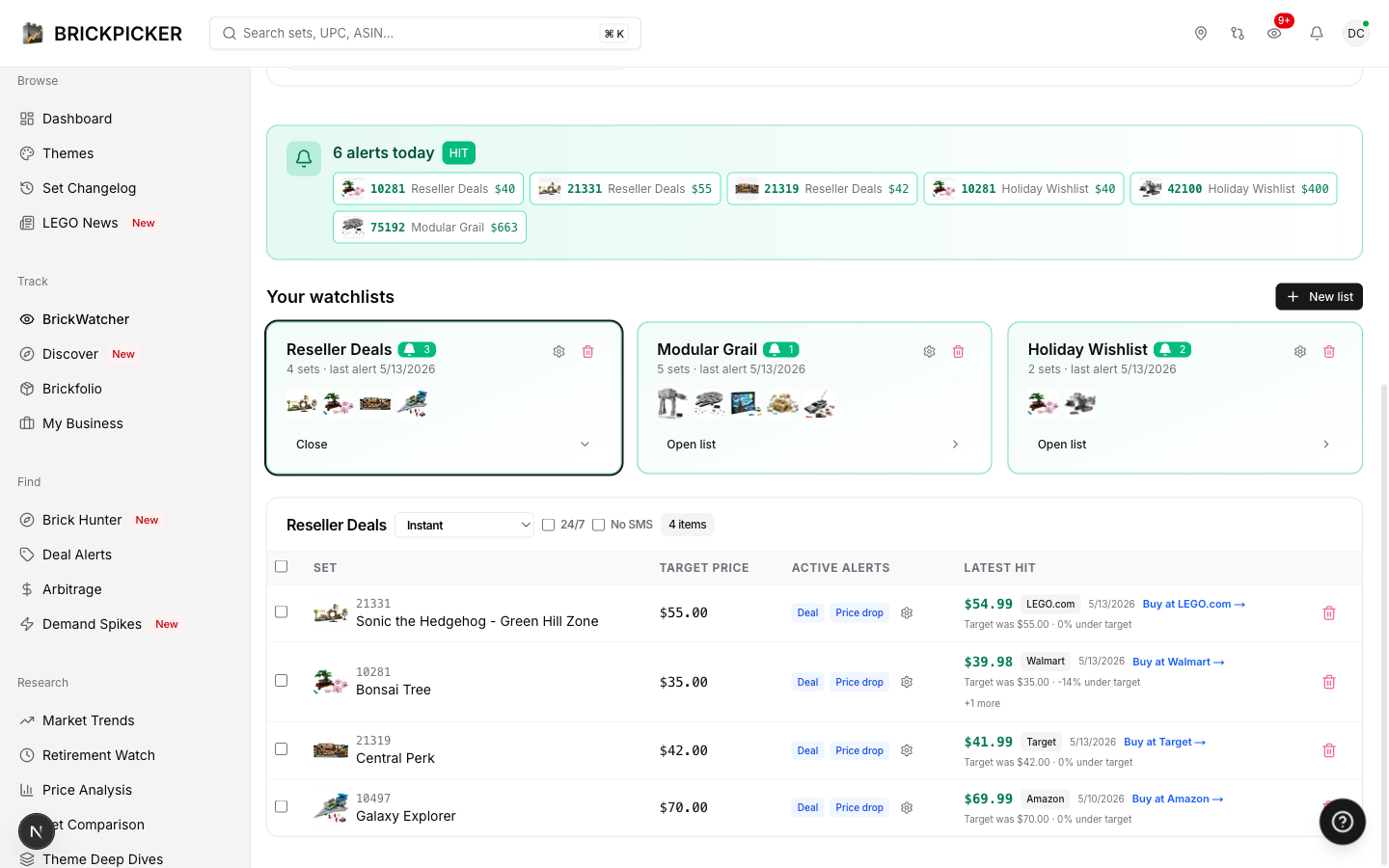
- Click New list in the top-right of the lists grid. Pick a template — Resale targets if you're flipping, Long-term holds if you're holding, Holiday wishlist if you're shopping for gifts. Hit Create.
- Open the list. Use the search to add three to five sets you actually care about — type a set number like
10281or75192and the autocomplete will find it. - Click the gear icon next to No alerts on each row to open the alert preferences. Toggle on Deal (set your discount threshold), In-stock nearby (set ZIP + radius), or whichever others match the persona above. Defaults are sane; just leave them.
- Set the list's digest cadence in the list header (Instant / Hourly / Daily / Use global). Save and close.
Then ignore it for a week. The point of BrickWatcher is that you should not have to come back to it — the alerts come to you. Open the cockpit when you want to see what's actionable today; otherwise let it run.
If you're not sure what to add, hit the Discover tab. We publish three curated lists that refresh daily: Newly retired (sets the model just flipped to likely_retired in the last 60 days), Top movers (biggest week-over-week sealed-median jumps), and Editor picks (a hand-curated starter set for resellers). One click subscribes you — we create a fresh list named after the curated one and add every set in it.
If you have a BrickPicker account, BrickWatcher is in the sidebar right now. If you don't, start with the free tier — one list, five sets, all five alert types, email delivery. Enough to feel what it does.
This is the first in a series of deep dives on every major BrickPicker feature. Next up: Brickfolio, the collection tracker. Subscribe to the blog or follow @brickpicker to catch it.
Until then — build a watchlist, ignore your inbox for a week, and let us tell you when something interesting happens.
— Jeff


